Since one of my 1T "not backed up" hard drives crashed last year, I have been shooting textural nature shots everywhere I go to build up my library. After spending a week in San Diego for Christmas I ended up with 500 pictures on my iPhone 4s. Some really great texture, so I will start sharing them here.
I won't be back in my studio until the 11th of January so I am really looking forward to getting back to work. Till then I will be using some of these to manipulate into images for printing on something different. This year I am going to see how many different alternative surfaces I can create for printing. Some of these images will end up on those surfaces.
Wednesday, January 4, 2012
Saturday, December 31, 2011
Tuesday, December 6, 2011
Digital Alternative Surfaces with Paper
Working with paper and paper elements you can create a thin textural substrate to enhance your digital print. I have included some closeups here from the samples for a workshop just published on KathyAnne Art -"Constructing Simple Surfaces for Digital Printing."
Sometimes it's the simple ideas that can get some amazing looks from your digital prints. Two of the ideas in this workshop include using cut up maps and regular old tissue paper. Map details are not in the pictures here.
The great thing about adding these elements to paper is that you can get a textural look from the paper where the map print is seen along with some surface texture by printing your digital image on this alternative surface. With tissue paper you can do all sorts of little crinkles in the tissue and still have the paper go through a regular pass through printer. The combinations of elements to define texture are of course unlimited. Experimenting with this amazingly fun!
The digital alternative surfaces pictured here have a spontaneous wrinkled surface. The details in the first 4 are from a sheet of soft paper that is wrinkled and then printed. It makes a luscious surface seen in person with a matte soft surface that invokes the texture of the image and the paper. The second set of more colorful prints substrate is a base of smooth thin kozo paper covered with tissue for the texture.
Sometimes it's the simple ideas that can get some amazing looks from your digital prints. Two of the ideas in this workshop include using cut up maps and regular old tissue paper. Map details are not in the pictures here.
The great thing about adding these elements to paper is that you can get a textural look from the paper where the map print is seen along with some surface texture by printing your digital image on this alternative surface. With tissue paper you can do all sorts of little crinkles in the tissue and still have the paper go through a regular pass through printer. The combinations of elements to define texture are of course unlimited. Experimenting with this amazingly fun!
The digital alternative surfaces pictured here have a spontaneous wrinkled surface. The details in the first 4 are from a sheet of soft paper that is wrinkled and then printed. It makes a luscious surface seen in person with a matte soft surface that invokes the texture of the image and the paper. The second set of more colorful prints substrate is a base of smooth thin kozo paper covered with tissue for the texture.
Saturday, November 26, 2011
Wacom Inkling
My new toy this weekend is the Wacom Inkling. It's a new pen, the short of it is-you draw and it records what you draw and you can bring the file into Photoshop, Illustrator or Sketchbook Pro. You can separate what you do into layers or just do it by the page as you draw. I have to say it is really a neat tool. This afternoon I brought some quick sketches I did into Photoshop. Then since I was working on an image in Corel Painter 12, I brought the sketch into Painter and filled the spaces with color. Of course I could have done that in the other 2 software programs also. I was just playing here for fun and to start to look at how I will use my Inkling.
One of the reasons I purchased Inkling was so I could easily sketch and write while working on workshops I teach over the internet. There are many times I would like to make a note on something and now with being able to digitalize what I write, I will be able to skip a step. Wow don't you love technology? Now I am thinking of all sorts of ways I can use this pen. I ordered my Inkling in August for September delivery, but it took somewhat longer. This was worth the wait and it was just delivered the day before Thanksgiving, so it is a good new toy for the weekend.
Friday, October 28, 2011
Metal-Texture-Pattern
Here's my latest stash of found metals along with detail shots of a few pieces. The metal sheet in the lower left corner of the first picture will eventually be printed. The metals themselves are going to be in patterns and textures to use in my digital prints before they find homes in my artwork and textured books. I am loving the surface of the crushed and rusty cans. This is an amazing eclectic collection of rusty stuff.
Monday, October 3, 2011
Crochet with Digital Prints
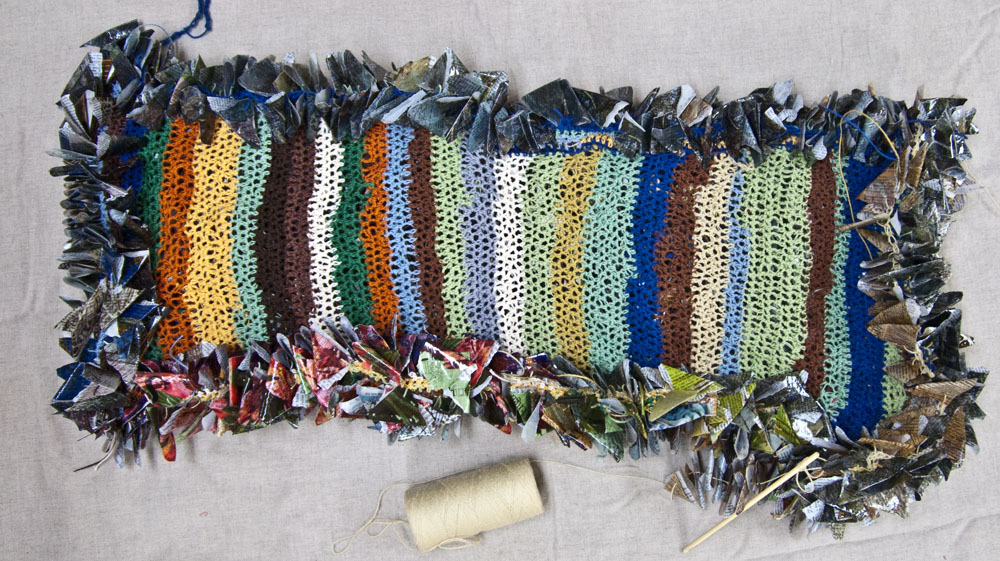
Crocheting elements for this piece is a challenging journey. My thoughts have been running around thinking of other configurations to use with the finished crochet, but the last few days have been spent enlarging the crochet surface on all sides. You can see the back, front and detail of the piece so far.
As the crochet evolves, pieces of digital prints on recycled dictionary paper are strung on the cotton in various colors. Slow going, but the textures are amazing and as I work different words and pictures come up in the random selections of pages and words that were over printed. I get to see all sorts of phrases and words that combine with the prints that will never be found again. Yesterday I took one of the squares out of the mix for my journal. Underneath the printing was a picture of several anthurium flowers. I still have one of those plants from my last trip to Hawaii. There are tons of word treasures in the prints.
My current plan is to crochet this out with all 100+ sheets of torn paper and then complete another layer of texture to strengthen the piece to hang. This is really digital alternative surfaces in a interesting textural composition.
Thursday, September 22, 2011
Digital Prints on Recycled Printers Plates
Printing on recycled printers plates is easy with a bit of prep. There are 2 printed plates depicted here. The prints created with Corel Painter 12 include one painted abstract and one pattern taken from another painted abstract background. The brushes from Corel are amazing and I have also been working with some of Jeremy Suttons custom brushes I downloaded from Paintbox TV. His brushes are wonderful to work with. I know Photoshop has brushes, but seriously, Corel has the brush category in a class of it's own.
To prepare the printers plates it took a little bit of work on the original surface of the plate. These plates were coated with turquoise and while it is possible to print them unless you use a white matte pre coat from inkAID, your print will reflect lots of the turquoise color or be a bit dark. I used a paint peeler type of chemical to rub out most of the turq color and ended up with a somewhat creamy surface. Actually a nice color to print on. The pre coat I used was inkAID clear matte. I sanded the surface and cleaned it with Citrasolv before using the pre coat. Once the print was dry, MSA varnish from Golden was used on top of the surfaces to protect the print.
Full plate, pattern from painted print
Detail of pattern
Full print, you can see the edges of the plate on this and the first picture
Detail
Tuesday, September 20, 2011
Recycling Papers with Digital Prints Update
My plans with the digital prints from my last post are in constant rethinking. Not really sure where this is going, but it seems I want to construct it into a forest book from my new series. I have been cutting pieces of hardware cloth to construct and try shapes. The process continues and everyday I think I am getting closer to where I want to be with this. Still up in the air.......
Tuesday, September 6, 2011
Recycling Paper with Digital Prints
This new piece in the works combines digital prints on recycled dictionary pages, ice resin, cotton cording, and crochet to create an extremely textural surface. The words play against the colors in the digital print. Once the prints are torn and strung on the cotton cord, the prints are crocheted. There are over 120 prints that have been lightly coated with ice resin that takes them to a shiny surface. Not sure how many prints are in this so far, but there is lots to go. The interesting way the prints and random shapes are connected assist me in wanting to push forward. I'm loving the textures as they combine with colors and shapes. Slow going, but fun!
Friday, August 19, 2011
Printed Metal Collage
Last week on August 12th at the end of my post I included a picture of a printed metal piece that was just starting. Here is the piece finished. It consists of several layers and I will start at the bottom and work up in the description.
When all the layers are together the bottom is hardware cloth as you saw in the original picture on the 12th. On the way up in the layers is metal screen and then a cut out of the printed metal. The surface is a digital print that originated with a detail of one of my pieces. From there I attached the metal to the hardware cloth and metal screen using beads and wire. The beads between the surfaces start to give the raised 3D look I want. From there a piece of crocheted brass wire is added to the pieces of wire from the tops of all the beads. For the top layer I wrapped silver wire around another cutout of the metal. This cut out was then added to the very top of the configuration. Picture and detail follows.
Subscribe to:
Comments (Atom)


